Download free software: antivirus, video editing, multimedia tools, mobile phone tools, dvd tools, office. Our site is a catalog for legal free full software; only freeware, no shareware, no demo.

Showing posts with label office tools. Show all posts

Monday, September 17, 2012

PrimoPDF


PrimoPDF is a freeware which converts almost any files to a PDF. The user just clicks on "print" command in the source program which was used to open the source file and selects "PrimoPdf" virtual printer. The output will be a PDF file. The software supports also the alternative to "drag and drop" source files onto a desktop icon for direct conversion.
Another useful feature of PrimoPDF is "Append or Overwrite" an already existing PDF. Document properties (security and so on) can be edited and the quality of the output PDF file can also be selected.
PrimoPDF is a fast and free PDF maker, if you are looking for a similar free PDF maker doPDF would be a good alternative.

Monday, September 3, 2012

PDFrizator


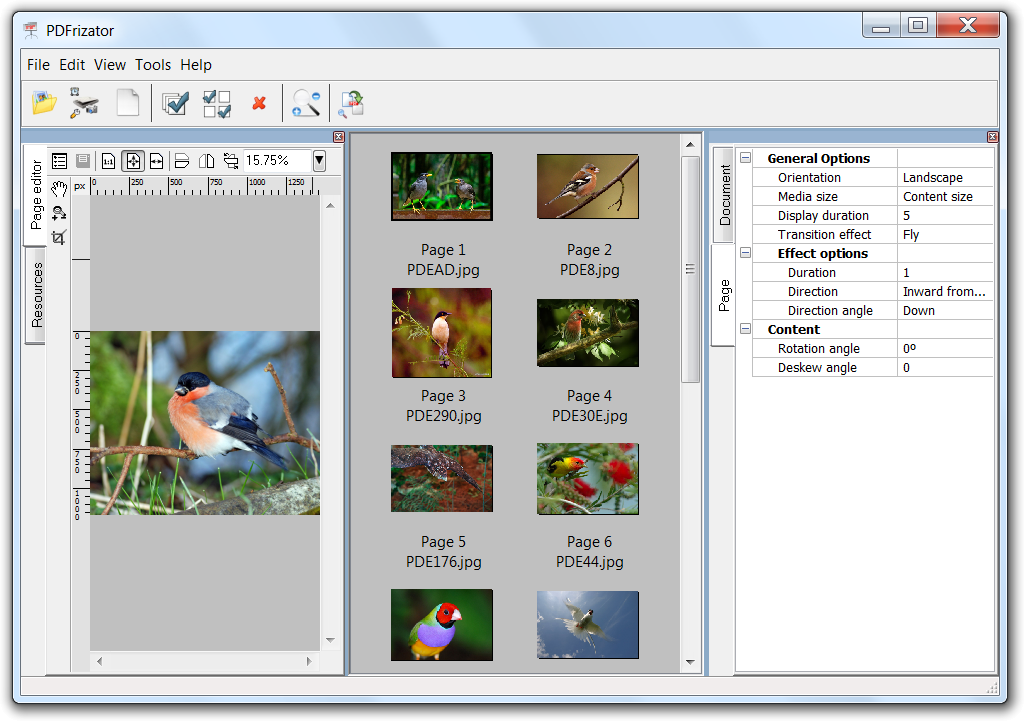
PDFrizator is a freeware tool to create PDF presentations with the ability to set transition effect between pages, viewing time and background music. This can be done to existing PDF files, or different type of supported file formats that can be converted, visual and combined in the same project.

Because it has the ability to convert more file formats, PDFrizator is also a handy tool to quickly and visually create PDF files.
key Features
* Create presentations PDF
* Convert more type of file formats (eg. Gif,. Jpg,. Png,. Tif,. Cbr. Cbz, ...) into PDF.
* Support adding file types to the project using the command line, drag and drop Shell, Internet search, or paste from Windows clipboard.
* Powerful Resource Explorer, the ability to browse local files and online services using the Internet, such as Bing pictures, images Google, Picasa, Flickr and Twitpic.
* Advanced Sound Explorer with built-in player to easily select local music files, or found on the Internet, searching sites such as SoundCloud.
* View and convert with ease. Cbr and. Cbz Comic Books (comic books) in PDF.
* Acquire (capture) TWAIN sources
* View paste, delete, rotate, rearrange and setting PDF page size results.
* Advanced GUI.
* Ability to install portable mode

Monday, April 16, 2012

doPDF, free pdf maker


doPDF is a small freeware application that creates PDF files from DOC, XLS, PPT, PUB, DOCX, XLSX, PPTX, PUBX, HTML, TXT. doPDF will install a virtual printer on your computer, choosing to print your document using this printer will create a PDF file. Alternatively, the PDF file can be created using doPDF user interface.
doPDF is free, has multilingual support and is available for 32-bit as well as 64-bit machines using Microsoft Windows OS.


Sunday, April 15, 2012

PDF Booklet Creator


PDF Booklet Creator is a free software which makes a booklet pdf from a normal pdf file. For example you can easily make a booklet with thesis summary for people present at your dissertation. Just write your summary as usually, convert it to normal pdf and import that normal pdf file in PDF Booklet Creator, it will convert it automatically to booklet. You don't need to worry about the confusing page numbering, the program will take care about it. PDF Booklet Creator can create book or calendar booklets.

Thursday, March 15, 2012

Tinkercad, a free 3D design tool for your 3D printer


Tinkercad is a free software developed for 3D printers like Makerbot. Extremely expensive at the beginning and available only for architects in the industry, 3D printing is slowly moving now towards the accessible zone for personal use. Imagine you could design your own objects and print them afterwards. Using a web interface, Thinkercad allows you to create objects on your computer and export them as STL files for your Makerbot 3D printer.


Sunday, September 19, 2010

Microsoft Reader for Windows Mobile, lit reader

Got some .lit files and couldn't read them ?
Lit files are a popular format for e-books, in case you have a smartphone windows based like those made by HTC and wondered if it's possible to read some books on it.

With Microsoft Reader for Windows Mobile you get:

Pan and zoom capabilities for embedded graphics
Screen rotation capability between portrait and landscape modes for more natural, comfortable reading
Remarkable content support and unmatched portability: Enjoy thousands of Owner Exclusive eBooks on Windows Mobile — and take your eReading library with you wherever you go. With Microsoft Reader for Windows Mobile you can easily copy books from your desktop/laptop/Tablet PC to your Windows Mobile and continue reading wherever you are!
Great on-screen readability: ClearType® display technology that makes text on screen crisper and easier to read than ever before. The adjustable font size setting makes it easy to customize your reading experience.
Dynamic reading: features include highlighting, bookmarking, note taking, and drawing. Plus, you can view your annotations and rename or erase any of them at any time.
Visit the Features page to learn about all the features in Microsoft Reader.

This version of Microsoft Reader is compatible with:

Windows Mobile 2003 based Pocket PC and Phone Edition devices
Windows Mobile 2003, Second Edition based Pocket PC and Phone Edition devices
Windows Mobile 5.0 based Pocket PC and Phone Edition devices
Windows Mobile 6.0, Windows Mobile 6.1
It is not compatible with Windows Mobile-based Standard (non-touch screen) devices.

Sunday, November 2, 2008

CutePDFWriter


CutePDFWriter is a freeware application that allows a person to easily create and save documents, with a touch of a button. Furthermore, it allows you to save your PDF files anywhere in your computer's system – making them easier to find. The pros of using this software is it saves files quicker than the Adobe software and it is easy to creat pdf files with the print function.

The cons of using this software is if you want to download a separate file, you must download Ghostscript first then download the file(s). Also, when saving the file(s), the size of it is so small, you need to magnify it just to read it, unlike Adobe, where te file can be viewed at normal size.

Download Link

Friday, October 31, 2008

OpenOffice


OpenOffice is an open-source, office suit software which can be used in many languages and works on common computers. OpenOffice is generally used for word, graphics, databases, presentations, and spreadsheet documents. The pros of using this software is that it allows you to do more than Microsoft Office 2007 applications and it is available in more languages than Microsoft Office 2007.

The cons of using OpenOffice are it takes up a lot of space on an old computer (about 336 MB), it doesn't have an application to create resumes, and is more complex to use than MS Office applications.


Download Link

Friday, October 24, 2008

PDF Printer


PDF Printer is an extremely useful program. It will allow you to print out PDFs from just about any Microsoft Windows Application. It also includes features such as Encryption, Water Marking, Merging with other PDFS, Adding Author's notes, and other useful things. PDF Printer is definitely one of the best free PDF creators you can find.

This bad boy does the same work that the overpriced PDF creators do, but for free. You will find it very easy to use, the navigation and overall format of the program make it foolproof. The install and setup is very smooth as well.

Thursday, July 24, 2008

Adobe Reader 9

Nowadays, everybody uses PDF files, because of their small size and their reputation for keeping the format and colors of the original document. Adobe Reader 9 is the perfect tool for viewing and printing this type of files.

Different from its previous versions, Adobe Reader 9 offers a professional looking interface, text search options and many more. The performance of this product has been enhanced and launching speeds are noticeable. With its built in Flash support, you can view different of file types, like SWF and FLV. A new concept has been introduced: PDF Portfolio, which lets you combine audio, video and other files into one single PDF. Adobe Connect offers users the ability to connect simultaneously and edit a PDF document. The newer version makes available new security improvements, like 256-bit AES encryption.

A big drawback for Adobe Reader 9 is that it uses more resources than its previous versions.

There may be other software that might replace Adobe Reader, but this is the solution for most of the users. Those programs might be faster and occupy less space, but with the price of not including some features of Adobe Reader.


Download Adobe Reader 9


Subscribe

AddThis Feed Button