How many times have you wanted to go ahead and use the pictures that you have stored on your computer so that they could then be played back on the DVD player? If this is true for you, then you need to get your hands on a software known as FlexVCD 1.1a. This FlexVCD 1.1a has the potential of allowing you to burn any of your slideshows that you create on your computer into CD or DVD format. It now becomes possible for you to save and store all your precious picture memories on disc. In fact with FlexVCD, it is even possible to go ahead and create multiple slideshows per DVD.
Showing posts with label cd/dvd tools. Show all posts
Showing posts with label cd/dvd tools. Show all posts
Wednesday, December 28, 2011

Monday, November 28, 2011
MagicDisc
One of the best software tools that has been specifically designed to help in the creation and management of virtual CD drives and CD/DVD discs is MagicDisc. By using MagicDisc 2.7.106, one is able to emulate data, audio as well as games together with ISO images, DVD and CD images. Features of the MagicDisc Virtual CD/DVD-ROM include the ability of offering speeds up to 200x along with the ability of accessing CD/DVD’s without the need for a physical drive. The fact that it supports the creation of up to 15 virtual drivers implies that one can play games, watch movies and also run softwares. It is also possible to hear audio without the need for inserting any disc into the ROM.
Friday, October 28, 2011
Instant CD & DVD Burner
Instant CD & DVD Burner 2.95 has many key features that help to burn video, audio and data DVD’s and CDs. While there are some features that make this burner stand out when compared to the standard Windows application, it does come with some built-in advertising. Unfortunately, many people have related bugs and crashed CDs with this program so use it on your own risk. Although Instant CD & DVD Burner has the ability of burning ISO discs and is freely available to download, one requires paying $30 for registering the program to avail of all the features. Another option is to choose the professional version wherein the user then has to download another version that again is filled spyware and adware programs.

Friday, June 17, 2011
Windows7 USB/DVD download tool
The optical drive tends to be the slowest part of your system. So why use your DVD-Rom drive to install windows operating system when your USB flash drive is much faster ? Microsoft has come with a solution to address this problem, a very small piece of software: Windows7 USB/DVD download tool.
So what actually does Windows7 USB/DVD download tool ? The answer is very simple: it takes a copy of Windows installing DVD in the form of an ISO file and places it on an USB flash drive. What you have to do next is to just boot from this USB stick instead DVD and proceed with Windows installation as normally. If you can't find in your motherboard BIOS the option to boot from an USB flash drive, than just press F11 during booting and choose from there your boot option (it works for most motherboards, just press the corresponding F to open boot manager). If you don't have the ISO file for your Windows OS you can make one with specific programs from CD/DVD tools section here.

Windows7 USB/DVD download tool give best results if you have in BIOS SATA enabled as ACHI instead of IDE compatibility mode.
download free Windows7 USB/DVD download toolSunday, March 20, 2011
Alcohol 52%

Like many other disc-emulation utilities, Alcohol 52% creates a virtual disc that can then be used to mount any disc that has been saved on the hard disc. This software avoids the need for the user to actually have the original CD/DVD present and is great in case of any damage to the disc or for backup purposes. Supporting a high disk read speed; there are also significant other features that support older discs, such as skipping any bad sectors and rereading the CD in case of errors. Other features also include support for Nero, ISO, and CloneCD. It is also capable of handling 31 virtual CD and DVD-ROM drives with the support for 25 languages.

Thursday, March 10, 2011
Action DVD Player

With the Action DVD Player, an individual can now manage his entire movie collection. All important video and movie formats such as AVI, MPG, MPEG, WMV, DIVX, XVID are supported by the Action DVD Player. With easy to use context menus and other features, the Action DVD Player is suitable for amateurs and professionals alike. A complete overview as well as detailed information for all movies upon selection is provided by the movie page. By simply clicking on the selected movie, the movie will start to play in the built-in theatre, which even features a full screen display mode. Version 2.6.9 has improved integration with the movie player.
download Action DVD Player from twistermp3 (publisher website)
publisher website looks buggy, bitdefender reported some virus there
alternate download link for Action DVD Player
publisher website looks buggy, bitdefender reported some virus there
alternate download link for Action DVD Player
Tuesday, March 1, 2011
Active@ ISO Burner 2.0

The latest version of Active@ ISO Burner allows one to modify configurations after burning such as verifying the disc, ejecting it or simply shutting down the PC. Active ISO Burner also allows one to burn an ISO image file to DVD-RW, CD-RW, DVD+R DL, CD-R, DVD-R, DVD+R, and DVD+RW. At the same time, one can also use the test mode to test the burning of the disc before the actual process. The greatest benefit of Active@ ISO Burner, besides its easy to use interface is the fact that it can also accept command line parameters so as to automate the purpose of burning ISO images.
Saturday, January 15, 2011
CDRom-Lock 0.6.1

CDRom-Lock is a small but effective program that has the ability of disabling the eject button on the CD/DVD ROM so that no one can access it. It also gives the user great control over almost every aspect of the CD/DVD drive right from the Windows system tray as a small icon is located there. This software tool is perfect for Notebook users and is also of great interest to desktop PC users. Some of the features of the CDRom-Lock 0.6.1 include the ability of locking, unlocking, opening or closing the CD/DVD drive by simply clicking on the system tray icon.
Thursday, January 6, 2011
AIV DVD Cutter
AIV DVD cutter can be used for the extraction of clips from a DVD movie. This is great as it can be used to trim down a DVD so that it can fit onto two CDs to help in saving disk space. Some of the advanced functions involve the ability of selecting the starting point, ending point, and also the length of selection. One can even decide to only play the selected portion of the movie. The latest version of AIV DVD Cutter includes play/pause, new selection, stop, volume controller and also displaying of facilities in full-screen format. Various minor bugs are also fixed.

Monday, March 1, 2010
BurnOn CD&DVD Burning Software

BurnOn CD&DVD is a CD and DVD burning application that supports a wide array of functions such as the duplication and backing up in 1:1 ratio mode of any unencrypted CD/DVD media. The BurnOn CD&DVD Burning software also allows the splitting up of DVD video movies so that they can then be fitted onto multiple CDs without the need for any additional plug-ins. It will also not copy discs protected with CSS. Now, one will easily be able to create his or her very own audio, video or even data compilations or even facilitate the extraction of audio and data tracks from media as singular files onto any storage media.
Tuesday, February 23, 2010
Free Movie DVD Maker 3.0.90723

Manufactured by Source Tec Software, the Free Movie DVD Maker is an extremely powerful DVD burner and movie maker that can be used on a wide array of video formats such as DivX, XviD, WMV, MTS, Real Video, M2TS, MPEG, MKV, AVI, H.264/AVC, MP4, QuickTime, and M2T, which can then be converted into DVD. There is also support for DVD-5/9, DVD+RW/-RW and DVD+R/-R as well as PAL and NTSC TV output. Easy to follow steps for the conversion and burning process make it an obvious choice for DVDs. One can also make a DVD menu. The newest version of Free Movie DVD Maker adds Windows 7 compatibility.
Monday, February 15, 2010
Ashampoo Burning Studio Free 6.76

Ashampoo is a disc burning utility that includes a variety of features such as multi-disc file backup on CDs, DVDs and Blu-ray discs. It can also be used for the creation of backups, utilizing a very powerful password protection option as well as can also automatically split up archives across multiple DVDs, CDs or Blu-ray discs. There is also an integrated in-built Audio CD ripper which stores all WMA and WAV files, different setting options that can be used to set the number of copies needed for burning as well as a verification process to test the CD before ejecting it. All types of audio formats such as FLAC, WAV, MP3, Ogg Vorbis and WMA are supported.
Wednesday, June 24, 2009
KernSafe TotalMounter v.1.32
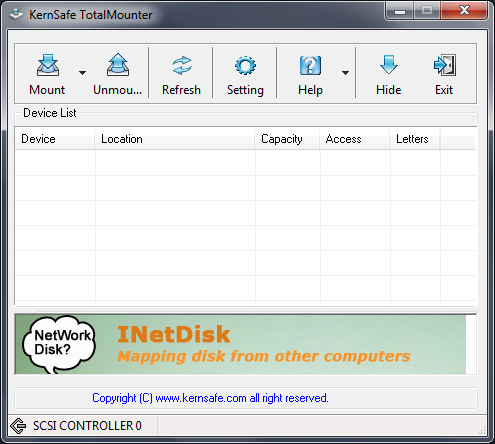
KernSafe TotalMounter features:
Provides a CD/DVD-ROM emulator that mounting image files such as iso, cdi, bin, mds, mdf, img, raw, ccd, nrg in to a virtual CD/DVD-ROM drive.
· Provides a CD/DVD-RW/RAM emulator that you can create "write" data into an CD/DVD drive, and you can also create ISO9660 files by using CD burning software.
· Provides a iSCSI Initiator for mount iStorage Server and other iSCSI Target.
· Provides a INetDisk client for mount INetDisk Server.
· Provides Virtual Write technology , so that you can copy files into a read-only drive and do not affect the peoples using other clients.
· Provides a network-bridged method. It exports an existing partition, disk, CD/DVD-ROM to clients as a virtual iSCSI drive.
· Provides as max as 8 virtual drives.
· Provides simple and banausic management tool, to manage virtual drives.
· Support for x86 and x64 machines.
· No restrictions on disk capacity, total number of hard disk installed, number of CPUs or CPU cores, and the amount of RAM.
· Fully conforms to the latest iSCSI Standard 1.0 (former Draft 20).
Requirements:
Operation System:
Microsoft Windows 2000 SP4 and Microsoft Windows XP Sp1 or above
32BIT: Windows 2000 /XP/2003/VISTA.
64BIT: Windows XP x64 Edition, Windows Server 2003 x64 Edition.
Hardware:
· 750 MHz Intel Pentium III class processor
· 256 MB of RAM
· 30 MB of disk space for application data
· Ethernet connection(for Mounting INetDisk and iSCSI)
Tuesday, May 5, 2009
Express Burn
Express Burn record data or audio discs quickly and easily by dragging the files you want onto the icon and clicking Burn CD. The software then does the rest, including converting the files if required. Express Burn is also the fastest CD/DVD writing program in the world using proprietary optimizing systems. But don't believe us, try it for yourself.
Writes the following types of discs:
· Data CDs (perfect for backup)
· Audio CDs (for traditional CD player)
· Mp3 CDs (larger capacity alternative to audio cds)
· Supports multi session recording to CD (you can choose to add more music tracks at a later time).
· Records CD Recordable (CDR) and CD Re-recordable (CDRW) discs.
· Can seamlessly burn audio CDs with no pause between tracks.
· Express Burn Plus can burn ISO compliant data DVDs and Blue-ray discs (DVD-R, DVD-RW, DVD R, DVD RW, BD-R, BD-RE, BD-R DL, BD-RE DL).
· Video DVD Authoring - video files will be re-encoded and made in to a standard DVD Movie disk, playable on a DVD player (Plus version only)
· Choice of widescreen or standard formats for video dvd authoring.
· Record video files to PAL or NTSC.
· Support Joliet and CDA formats.
· Data CDs support multilevel folders and long file names.
· Audio CDs are recorded with direct digital recording (so perfect audio quality is maintained).
· For Audio CDs it supports wav, mp3, wma, au, aiff, ra, ogg, flac, aac and a number of other audio file formats.
· Data CDs are fully ISO compliant with Joliet extension.
· Includes command line operation for automation and integration with other programs.
· Supports fast, right mouse click functionality for burning ISO images.
· Simple, easy to use interface for day-to-day operation.
Requirements:
· CD-ROM drive which supports recording.
· For DVDs a DVD-ROM drive which supports recording.
· For Blu-ray Discs a BD-ROM drive which supports recording.
Monday, February 23, 2009
Virtual CloneDrive 5.4.2.3 Beta

Do you want to emulate your CD/DVD-ROM drive ?
Virtual CloneDrive gives you the possibility to run programs from CD/DVD without the need for physical CD/DVD drives or the actual CD/DVD media. You actually clone your disc and use its image from your hard drive.
Virtual CloneDrive is similar to other disc emulators like daemon-tools or Alcohol 120%, however it supports only the following images: .ccd; .img; .dvd; .iso; .udf.
Here are some key features of "Virtual CloneDrive":
· Supports all common image formats such as ISO, BIN, CCD
· Supports up to 8 virtual drives at the same time
· Easy to use - just double-click an image file to mount as a drive
· Virtual CloneDrive is freeware, you may use it at no cost.
Tuesday, December 16, 2008
InfraRecorder
 Do you hate Nero Burning Software, or at least you hate the way nero works ? Well, here is an alternative. InfraRecorder is a CD/DVD burning application that can be used on Microsoft Windows machines with Windows 2000 up to Windows Vista installed on it. One cool thing about this software besides the fact that it has an easy to use interface and Windows Explorer integration, InfraRecorder is also distributed Free of charge under the GPL License.
InfraRecorder application Features:

*Create discs that may include the following multimedia: custom data discs, audio, images, mixed data discs and everything that fills the word 'data' on a computer.
* Record dual-layer DVD discs.
* You have 4 methods of Blanking (erasing) rewritable discs.
* Burn disc images such as .iso, .bin, .cue, etc...
* Block Multisesion discs, prevent further data to be added on the disc.
* Show certain discs information.
* Automatically save your audio or data tracks to files (.wma, .iso .wav, .ogg, .mp3).
* And many other interesting features awaiting to be discovered.
Download InfraRecorder 0.46.1:
Windows 2000/XP/Vista version (3.19 MiB)
Download | Mirror

Other download options:
- Installer (Windows 2000/XP/Vista, 3.19 MiB)
- Installer (x64, 3.30 MiB)
- Zip archive (Windows 2000/XP/Vista, 3.69 MiB)
- Zip archive (x64 3.49 MiB)
- Zip archive (portable version, 3.47 MiB)
- Zip archive (portable x64 version, 3.23 MiB)
Friday, November 7, 2008
Daemon Tools Lite 4.12.3

Daemon Tools is an emulation freeware best suitable for mounting and creating images with different types of extensions such as: .iso, .nrg and other less common terminations. Actually Daemon Tools is very often used for mounting virtual images found on torrent files, and often contains an entire CD or DVD copy, the exact perfect copy of the original release. This version "Daemon Tools Lite 4.12.3" is a free version of the program, there is no trial or any necessary key, you can simply install and use.it This freeware can be installed on Win 2000, XP and also Vista OS. It's free of charge and there are no restrictions. Actually you can mount as many virtual images as you'd like, without any interruption. There is also a Professional version of Daemon Tools, but we have to say it, it really is for professional usage. This software is more than enough for you to enjoy and mount anything you'd like. There are some cool features that this freeware offers, like the fallowing:

Daemon Tools Lite 4.12.3 Features:
- Supports: bin, rar, mdf, mds, bwt, cdi, b5d, b6d, ccd, cue, pdi, and many other unknown virtual image extensions.
- Daemon Tools is used only for mounting virtual images on Virtual Drives, not burning them, like Alcohol 120% .
What's New in Daemon Tools Lite version 4.12.3:
- Latest version bugs were fixed,
- Languages got some updates,
- Minor Setup changes.
Choose a Download Link Bellow:
Daemon Tools Lite 4.12.3 Download
Thursday, June 26, 2008
NRG2ISO

(File Size: 359 kb)
NRG2ISO is a very simple freeware with a friendly easy to use Menu. If you made some disc images with Nero burning software you know what nrg files are. This software, as it's name says, can convert nrg virtual image files to standard iso disc image files with just a simple mouse click. There isn't much to explain here as it says all by the title itself. Very useful if you need to exchange .nrg to .iso which is a standard virtual image extension, same as .nrg. This software is actually distributed free of charge and it has gathered much popularity during past years. You can have it now for free and get your needs done in no time.
NRG2ISO Features:
- One simple and powerful feature, it simply converts .nrg virtual image extension to .iso
NRG2ISO is a very simple freeware with a friendly easy to use Menu. If you made some disc images with Nero burning software you know what nrg files are. This software, as it's name says, can convert nrg virtual image files to standard iso disc image files with just a simple mouse click. There isn't much to explain here as it says all by the title itself. Very useful if you need to exchange .nrg to .iso which is a standard virtual image extension, same as .nrg. This software is actually distributed free of charge and it has gathered much popularity during past years. You can have it now for free and get your needs done in no time.
NRG2ISO Features:
- One simple and powerful feature, it simply converts .nrg virtual image extension to .iso
Download NRG2ISO
Subscribe to:
Posts (Atom)
Subscribe


